


I have a challenge to solve that is getting over my head.
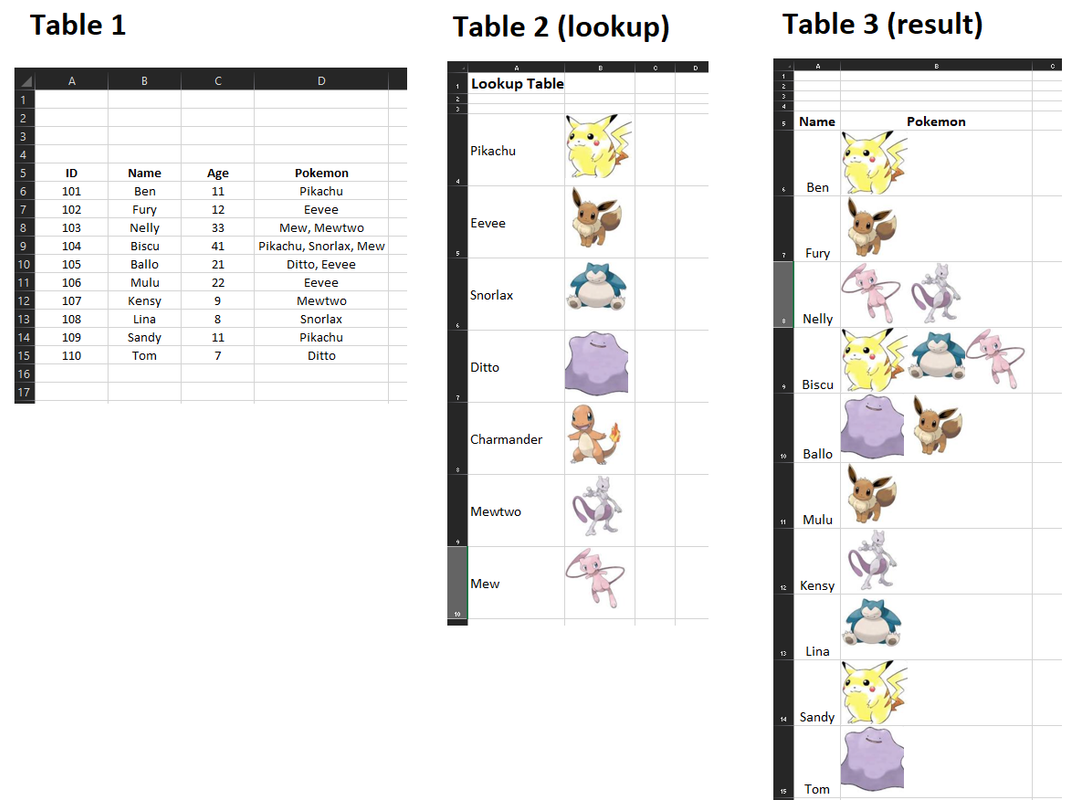
In the Excel card are 3 tables.
Table1 with text entries,
Table2 is a matrix that has the respective photo for the Pokemon name
Table3 should be the result, where only the name and its Pokemon collection should appear as images.
I'm trying to do a VLOOKUP but with multiple images.
I found out how to delete images in the Table3 to make it possible to recalculate based on the pokemon list in Table1
Sub RemoveImages()
    Dim s As Shape, rng As Range
    Set rng = Range("B6:B100")

    For Each s In ActiveSheet.Shapes
        If Intersect(rng, s.TopLeftCell) Is Nothing Then
        Else
            s.Delete
        End If
    Next s
End Sub
I found out how to loop and copy and paste images
Sub CopyPasteImages()
  For i = 6 To 50
    Range("C" & i).Copy
    Range("D" & i).Select
ActiveSheet.Paste
  Next i
  Application.CutCopyMode = False
End Sub
Unfortunately, my VBA skills are not enough to pick the images associated with the Pokemon and display them like in Table3?
could anyone help me please
Attached is my Excel file
Pokemon.xls


 Reply With Quote